Manage databases, servers, and terminal sessions in one native desktop app, with AI Agents working beside real connections, query results, and command output.
Navop uses Rust and GPUI for its native desktop interface, with GPU rendering for a fluid multi-connection workflow and no WebView dependency.
Native workspace live previewNavop Desktop · Product Overview
Real product interfaces
Follow real work from connection to execution
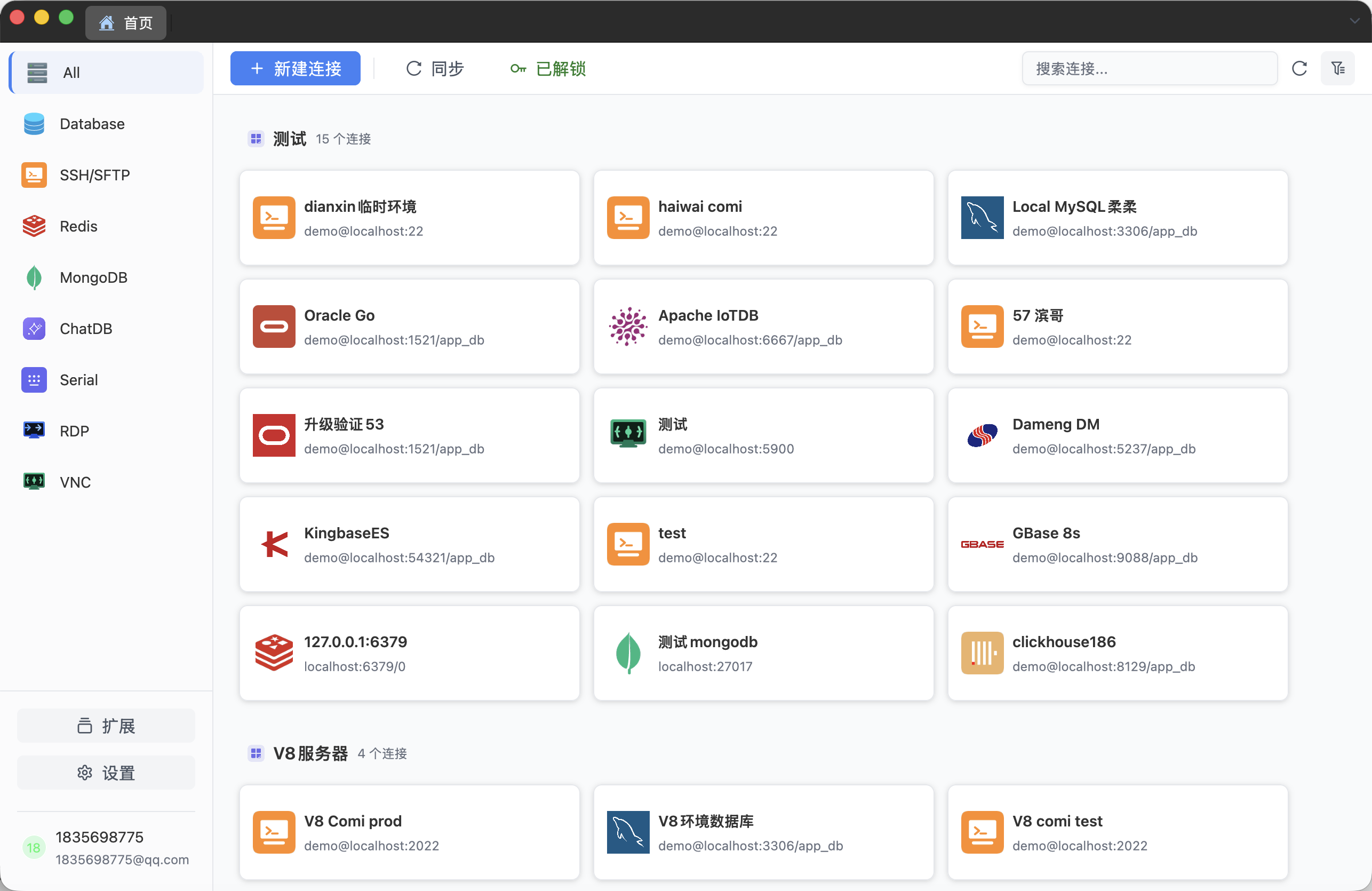
Navop brings connection navigation, database work, remote troubleshooting, and Agent Hub into one workspace, placing a familiar Agent coding workflow beside real connections and terminals.
01
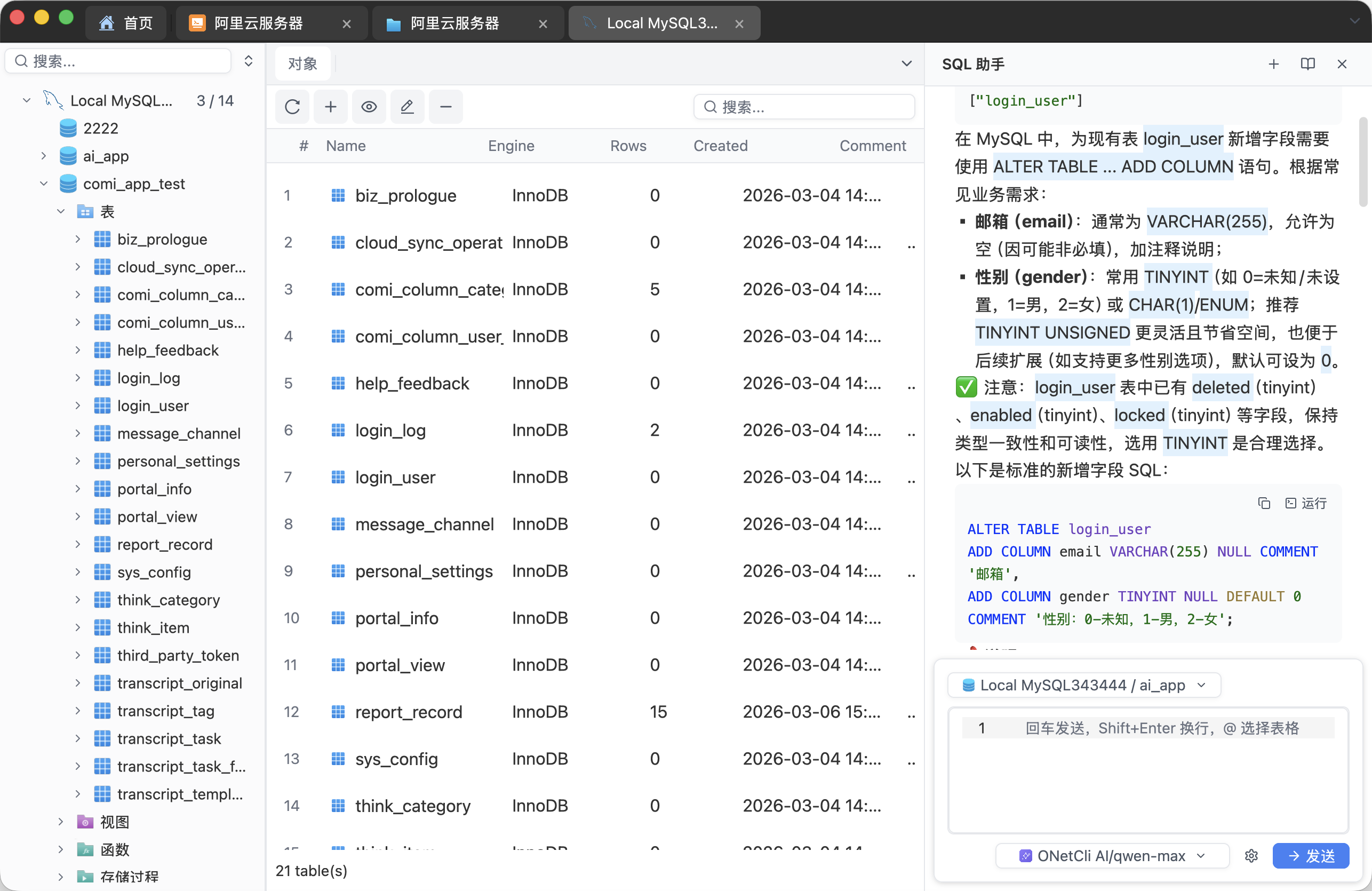
Database and SQL workspace
Manage multiple database connections, browse objects, run SQL, and keep an AI Agent beside the active database context.
Open tables, columns, views, functions, and ER diagrams quickly
Run queries, manage transactions, and view or edit results in the same workspace
Import and export data, design schemas, and compare or synchronize databases
Generate and explain SQL with optimization suggestions
ConnectionsObject browserSQL assistant
02
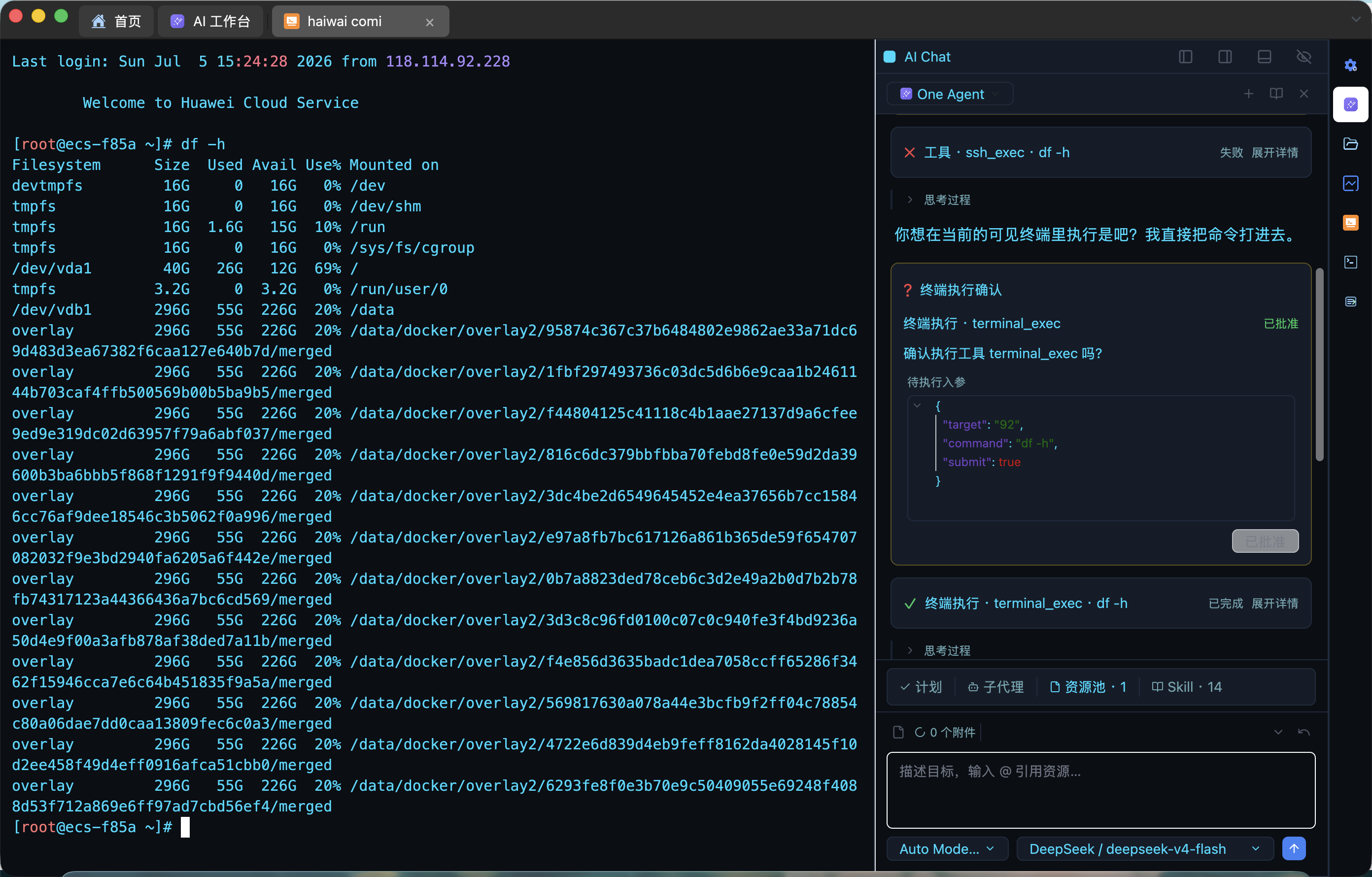
SSH and remote operations
Keep terminals, file transfer, remote editing, and server troubleshooting inside one connection context.
Organize sessions with local profiles, tabs, and native terminal splits
Use broadcast input, quick commands, and the AI sidebar for repeated work
Upload, download, copy between servers, and remotely edit files through SFTP
Continue with port forwarding, server monitoring, and remote desktop access
Terminal and splitsSSH / SFTPRemote connections
03
Agent Hub: code, resources, and Git
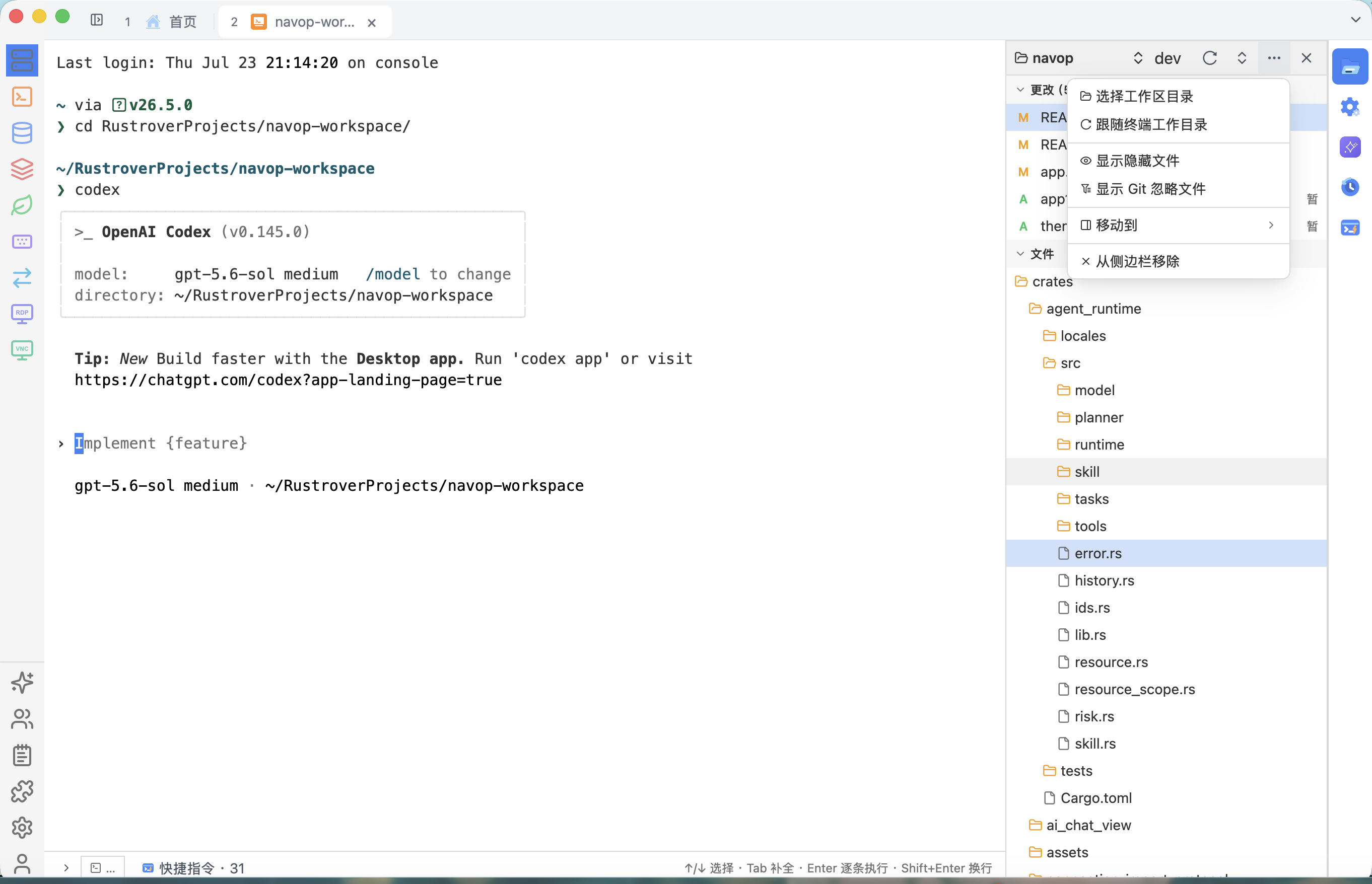
Use a composite workspace familiar from established Agent coding tools, with the terminal Agent, project tree, branch controls, change list, and side-by-side diff integrated into one Hub.
Select a workspace manually or follow the terminal directory, with optional hidden and Git-ignored files
Search, create, fetch, push, and switch local or remote branches
Locate Agent edits and compare HEAD with the working copy before deciding what to commit
Terminal AgentWorkspace resourcesGit branches and diff
04
Unified themes and appearance
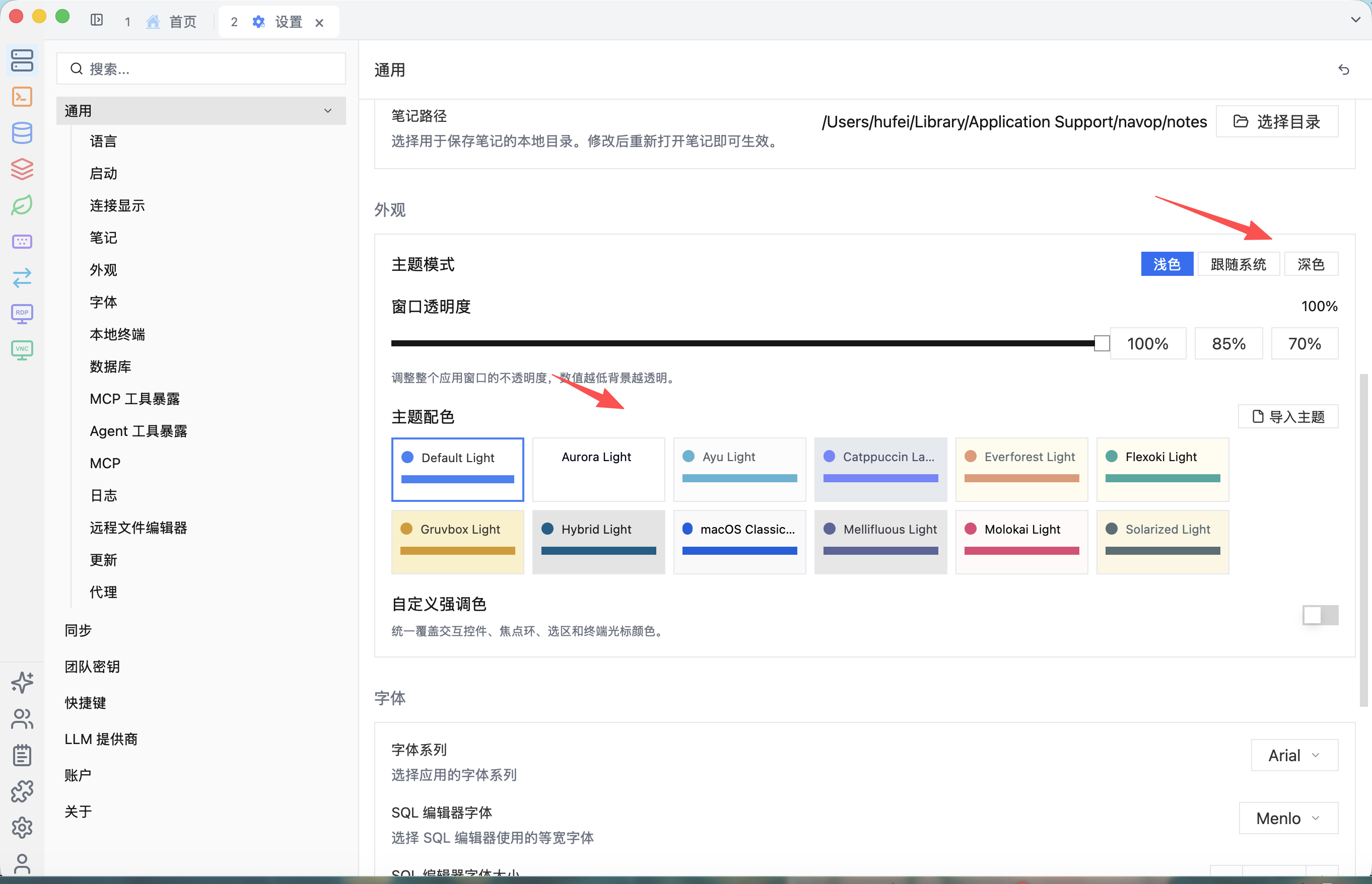
Coordinate application and terminal colors, then adapt the interface to different working environments.
Choose light, dark, or system-following appearance
Import application and terminal themes and set a custom accent color
Adjust window transparency while preserving readability
Light and darkTheme importsAccent and opacity
What Navop supports
Complete workflows organized around data and remote connections
Browse by capability, then verify the exact databases, protocols, and current support maturity.
01
Relational and extension databases
Queries, object browsing, and multi-database connection management.
Built inMySQL, PostgreSQL, SQLite, TDengine
Built inSQL Server, Oracle, ClickHouse, and DuckDB
ExtensionDM, KingbaseES, OceanBase, openGauss, and other extension drivers
02
Redis and MongoDB
Bring cache and document data into the same workspace.
Built inRedis keys, values, and cluster management
Built inMongoDB collections, documents, and queries
Built inMQTT subscribe, messages, and publish
03
Servers and remote connections
Terminals, files, and remote desktops share one connection context.
Built inSSH, SFTP, and port forwarding
Built inLocal and remote terminals
Built inNative terminal splits and tab dragging
Built inMulti-terminal broadcast input
Built inGrouped quick-command management
Built inLaunch-time local terminal profile selection
Built inAI sidebar for local and SSH terminals
Built inDirect server-to-server SFTP copy
Built inKnown hosts management with system known_hosts import
Built inRDP and VNC remote desktops
Built inSerial connections
Built inTelnet terminal and auto-login
04
Files, structure, and monitoring
Complete common supporting tasks around remote environments.
Built inDrag-and-drop transfer and remote file editing
Built inServer status and native charts
Built inER diagrams
05
AI Agents and automation
Place intelligent assistance beside SQL, query results, and terminals, with Skills that preserve reusable workflows.
Built inSQL generation, explanation, and optimization suggestions
Built inQuery-result analysis and charts
Built inCommand explanations and troubleshooting suggestions
Built inAgent Hub: terminal agent, project files, and Git workspace
Built inNavop Skill: resource context and reusable workflows
Built inPublic MCP, Navop CLI, and Agent Skill
06
Team collaboration
Manage member boundaries and collaborate around shared connections.
Built inTeams, members, and roles
Built inEncrypted shared connections
Built inDesktop team synchronization
Built inExtension
Designed for daily development and operations
Keep connections, operations, and Agent automation in one native workspace
01
Manage connections
Put databases, middleware, servers, and remote resources into one native workspace with grid and tree views plus batch management on home.
02
Work with data
Browse schemas, run queries, batch-edit table data, and compare schemas and data without leaving the database context.
03
Execute remotely
Organize multi-connection work with terminal splits, broadcast input, quick commands, SFTP, and session recording with replay.
04
Agent automation
Reuse analysis and troubleshooting flows through Navop Skill, Agent Hub, and Public MCP with explicit authorization boundaries.
Layered documentation
From a five-minute quick start to a complete product manual
Browse chapters on the left, read in the center, and jump through headings on the right.
Choose a database type, enter connection details, test it, and open the workspace.
01 Choose a database type
Team workspace
Team management and shared connections
Create teams, invite members, and share common connections with collaborators. The desktop app remains the place for connection work and local workflows.
Navop Team WorkspaceCreate teams, invite members, and share common connections with collaborators. The desktop app remains the place for connection work and local workflows.